FireQ Polls
Engage with firefighters and collect feedback and opinions quickly and easily.
Access your FireQ app settings by tapping the MORE button in the lower right corner.
From the available settings, tap POLLS.
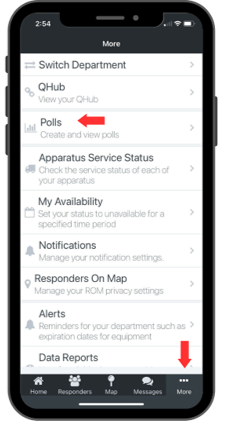
FireQ app Settings Location for Polls
Tap the CREATE button.
FireQ app Create Polls Button
The ability to create polls is a permission that must be granted to the firefighter in the FireQ software.
Types of Polls
There are three types of polls available in the FireQ app:
Straw Polls
Straw polls allow firefighters to vote and see the results after they have submitted their votes. They cannot see who voted. People with permission can see who voted and how.
Secret Polls
Secret polls allow firefighters to vote but they cannot see the results. Permission is required to see the results and who voted.
Anonymous Polls
Anonymous polls allow firefighters to vote without anyone knowing how they have voted. The names of voters are not retained and cannot ever be viewed. All voters, however, can see the results after their vote has been submitted.